
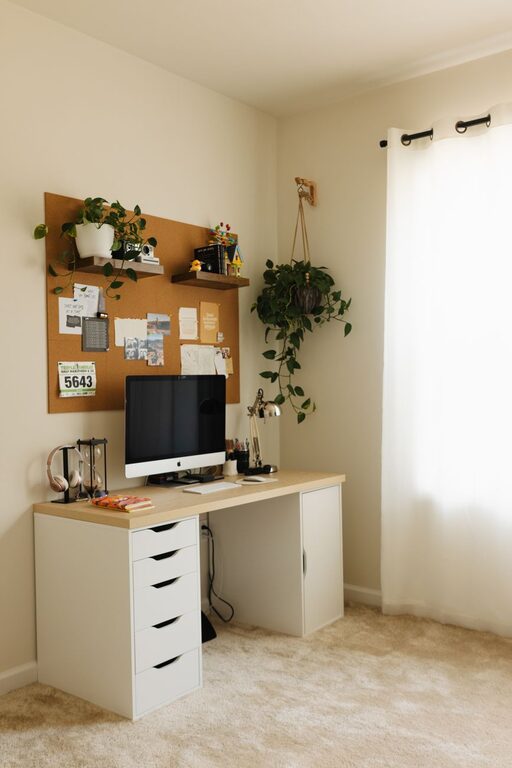
Creating a productive home workspace environment is essential for anyone working remotely or managing tasks from home. A well-designed workspace can help increase focus, reduce stress, and improve overall work quality. Whether you have a dedicated room or a small corner, these tips will guide you in setting up an efficient and comfortable home office.
Choose the Right Location
Selecting the best spot in your home for your workspace is the first step. Ideally, pick a quiet area with minimal distractions and enough natural light to keep you alert.
– Natural Light: Position your desk near a window if possible. Natural light reduces eye strain and improves mood.
– Quiet Environment: Avoid high-traffic zones like living rooms or kitchens where family activity might interrupt your concentration.
– Space: Ensure there is enough room for your equipment and some storage for supplies without feeling cramped.
Invest in Comfortable Furniture
Spending long hours working requires furniture that supports your health and comfort.
– Ergonomic Chair: Choose a chair that supports your back and allows your feet to rest flat on the floor.
– Desk Height: Your desk should be at a height where your elbows rest comfortably at about 90 degrees when typing.
– Adjustable Furniture: Consider adjustable desks or chairs to change positions during the day to prevent stiffness.
Minimise Clutter and Organise
A tidy workspace promotes a calm mind and helps you stay organised.
– Declutter Regularly: Remove unnecessary items daily to keep your desk clear.
– Storage Solutions: Use shelves, drawers, or organisers for documents and office supplies.
– Cable Management: Use clips or ties to keep wires neat and out of the way to avoid distractions.
Ensure Good Lighting
Lighting can affect both your productivity and your wellbeing.
– Ambient Lighting: A well-lit room is important. Use ceiling lights or lamps to create a balanced light.
– Task Lighting: Add a desk lamp with adjustable brightness for focused work or reading.
– Avoid Glare: Position screens and light sources to prevent reflections that strain your eyes.
Personalise Your Space
Adding personal touches can make your workspace feel inviting and motivating.
– Plants: Indoor plants improve air quality and add a calming natural element.
– Artwork or Photos: Use images that inspire or uplift you to create a positive environment.
– Colour Scheme: Choose colours that appeal to you but avoid overly bright or distracting shades.
Set Boundaries and Work Hours
Maintaining a balance between work and home life is crucial.
– Dedicated Workspace: Keep work confined to your workspace to switch off easily after hours.
– Work Schedule: Create and stick to a routine with clear start and finish times.
– Breaks: Schedule short breaks to stretch and rest your eyes, helping maintain focus.
Use Technology Wisely
The right tools can support productivity but avoid letting technology become a distraction.
– Reliable Equipment: Invest in a good quality computer, headset, and fast internet connection.
– Minimise Notifications: Turn off non-essential alerts during work periods to avoid interruptions.
– Use Productivity Apps: Consider apps for task management, time tracking, or focus timers.
Maintain Good Air Quality and Temperature
Comfortable air and temperature levels contribute to concentration and wellbeing.
– Ventilation: Open windows regularly or use fans/air purifiers to keep the air fresh.
– Thermostat Settings: Keep the room at a comfortable temperature, ideally between 18-22°C.
– Avoid Overheating: Dress appropriately to stay comfortable without relying too heavily on heaters.
—
By thoughtfully setting up your home workspace using these tips, you can create an environment that helps you stay productive, comfortable, and motivated. Remember, the key is to design a space tailored to your needs, where distractions are minimal and comfort is prioritised. Over time, small improvements to your workspace can make a big difference in your workday satisfaction and efficiency.